Showing posts with label Software. Show all posts

Friday, October 10, 2025

AI Photo Editing

I have been using AI photo editing software to remove unwanted objects from some of my old photos. In this example, I simply typed "remove white space on right middle of photo". It's that easy!

Wednesday, October 08, 2025

Tesla FSD 14.1

Tesla's Full Self-Driving technology just keeps getting better...

Sunday, September 14, 2025

Improving Photos

In addition to Google's Gemini being able to create interesting images, it can also remove unwanted objects from your photos. Here is one of a supermoon that has power lines that I found distracting...


By simply asking Gemini to remove the power lines, I got this image...

Thursday, September 11, 2025

Gemini Image Editing

I have been playing around with Google's Gemini image editing software and it is amazing! I took a photo of my neighbors and asked Gemini to put her face on a bikini model. Here are the before and after images...


Saturday, May 11, 2024

Windows "S Mode"

A friend here in the park bought a new computer with Windows 11. When she tried to install an app for one of her devices, it was denied. It turned out that the computer was sold in the "S mode" which will only allow apps that are in the Microsoft Store to be installed. Also, included in the factory installed software was McAfee Antivirus which I have found to create more problems than it is worth; I recommend deleting it before doing anything else with your new machine. If you run into a similar problem, here's Microsoft's directions for switching out of S mode:
  • Windows 11 in S mode is designed for security and performance, exclusively running apps from the Microsoft Store. If you want to install an app that isn't available in the Microsoft Store, you'll need to switch out of S mode.
  • Windows 11 in S mode is only available in the Windows 11 Home edition. If you have the Pro, Enterprise, or Education editions of Windows 10 in S mode, Windows Update will not offer Windows 11 because S mode is not available in those editions of Windows 11. Therefore, if you have the Pro, Enterprise or Education editions of Windows 10 in S mode, you'll need to switch out of S mode to upgrade to Windows 11.
  • Switching out of S mode is one-way. If you make the switch, you won't be able to go back to Windows 10 or Windows 11 in S mode. There's no charge to switch out of S mode.
  • To switch out of S mode, click here to open the Microsoft Store to the Switch out of S mode (or similar) page.
  • On the Switch out of S mode (or similar) page, select the Get button. After you see a confirmation message on the page, you'll be able to install apps from outside of the Microsoft Store.

Friday, March 08, 2024

Bitcoin

Long time followers of this blog know that I began mining cryptocurrency back when Bitcoin was around $100/coin. Currently, it is at an all time high of approximately $69,000/coin. I now have over $6,000 in cryptocurrency at today's rates (not bad for a passive income).

Back in January, I posted an article on Kryptex mining software which has turned out to be one of the more profitable programs I have tried. One unique feature of the software is the myriad of ways you can redeem your cryptocurrency...


After choosing a $50 Amazon eGift Card, I received an email within 48 hours that allowed me to deposit the credit directly into my Amazon account without any complications. If you would like to try the program and have a high end computer with excellent cooling, here is my referral code: https://www.kryptex.com/?ref=006df462.

Wednesday, February 14, 2024

Live Streaming Video

I have been playing around with ways to live stream video from my smartphone to the Internet. Most of the apps I tested were a little too complicated, particularly, for those who are not tech savvy. The VDO.Ninja site solves that problem by making the process incredibly simple without having to download any software. Just go to https://vdo.ninja/, click on "Add your Camera to OBS" where it will automatically recognize your phone's camera and then all you have to do is hit "START". It will create a URL that when entered into a browser, will show your live video. That URL can be sent to others who can view that same video via the Internet. Here's a YouTube video that will give you more detail...

Wednesday, January 03, 2024

Kryptex Cryptocurrency Miner

There are a number of Windows based programs that will allow you to earn passive income by mining cryptocurrency such as Bitcoin using your home computer. They run 24/7 in the background with an Internet connection and you can still use your PC for other tasks. It should be noted that these programs run hot and your system needs to have excellent cooling capacity. My experience has been not to run them on laptops as they generally overheat and then shut down.

I am trying out another cryptocurrency miner called Kryptex. It supposedly generates more income than most other miners. If you would like to try it along with me, here is a referral link: https://www.kryptex.com/?ref=006df462. The program is projecting I will earn around $40/month (at current Bitcoin prices) with my RTX 3080 GPU. Time will tell.

Wednesday, April 01, 2020

Use Your PC To Fight COVID-19

Folding@home uses distributed computing to do disease research. It has been around for years, but has recently turned its attention to the COVID-19 virus. You can help in the fight by downloading their program to your personal computer and letting it run in the background. You can choose to run it full time or just when the computer is idle. You can also choose how much power you wish to use. For more information, click here.

Saturday, December 21, 2019

Brave Browser

I recently switched from the Chrome browser to the Brave browser for accessing the Internet. The initial reason for the switch was the ability to earn cryptocurrency (BAT coin) while browsing the web as I normally would with Chrome and viewing just the ads I choose to read (you can turn these ads off if you like). However, it turns out I am only making a few cents a day, so it is not worth it for just that purpose.

What has kept me using Brave is its speed and privacy. It is much faster than other browsers I have used in that it blocks all those annoying ads, pop-ups and autoplay videos I had been receiving. Perhaps more importantly, it blocks trackers that allow access to your web activity and data which is then sold to the highest bidder. Here's a snapshot showing that it has blocked 8,575 ads/trackers while saving me 8 minutes and earning 22 cents in BAT coin to date.


I did find that there are times when you do not want it to block certain parts of a web page. I use a script on this blog to show the the location of "Visitors" which Brave was blocking. Thankfully, you can turn off the "shield" for any site you choose and view it without any blocking at all. The browser is free, so give it a try and let me know what you think of it in the comment section below.

Tuesday, May 21, 2019

$20 Wyze Cam

In anticipation of spending time away from my Big Horn this summer so as to avoid the oppressive heat in Las Vegas, I thought it would be nice to have a security camera which would allow me to monitor the interior of the RV while out of town and to receive push notifications if someone enters the vehicle. However, I did not want to spend the big bucks that most security cameras cost along with their cloud subscription fees.

Fortunately, I came across the Wyze Cam which I bought for $27.63 delivered ($19.99 camera + $5.99 shipping + $1.65 sales tax). It not only does everything I was looking for but a lot more such as an email alert when the smoke alarm or carbon monoxide monitor is activated. I will not go into all the benefits & features of the camera as you can view those for yourself on their website along with their accessories. I am still learning how to use the Wyze Cam software but so far, I like what I see.

Thursday, January 03, 2019

Gaia GPS

Most hardcore OHV owners I have met have one or more navigation apps that they run on their gps enabled smartphones &/or tablets. Here is an excellent video on the benefits and features of the Gaia GPS software...


Saturday, November 24, 2018

Allergic Reaction

It appears I have had an allergic reaction to my most recent macular degeneration injection...


Hopefully, I can get it cleared up with a little Benadryl and be back to normal in no time.

Update (12/8/2018): I received an email from Google indicating that this post contained "Shocking Content" and as a result Google AdSense would be restricted. I solved the problem by simply deleting AdSense. It appears we have become a Nation of Snowflakes.

Friday, October 26, 2018

Memento Database App

While looking for an app that would make creating a home inventory list easier, I came across a terrific program called Memento Database. It allows you to record and retrieve all kinds of information right on your smartphone.

It comes with a home inventory template which can have you up and running in a very short period of time. You simply photograph your asset and it is automatically inserted  into the database. Then you enter whatever information you wish such as date of purchase, value, condition, etc. If your priceless Slim Whitman record collection is ever stolen or destroyed, you will have documentation for the insurance company.

In addition to a plethora of templates for almost any occasion, you have the option to design your own "libraries/tables" with whatever "fields" you wish to include. Best of all, it's free!

Tuesday, October 23, 2018

Contact QR Code

QR codes are two-dimensional barcodes containing information that can be viewed using a QR code reader. You see them in stores, magazines, etc. It is a great way to store data in an easily machine-readable format.

As a full-time RVer, I am continually meeting people that I want to share contact information with, particularly, the url of my blog. I have some calling cards that I can hand out but there are occasions when I do not have them with me. However, I generally carry my smartphone wherever I go so I created a barcode that contains my name and blog address using a QR code generator...


I keep the above image on my phone so that it can be scanned by others with smartphones. It's a quick and easy process that, hopefully, you can use.

Thursday, October 18, 2018

Photo Editing Apps

I have been playing around with photo editing apps for smartphones. You can do something really cool things including making dull, boring photos look interesting...

Varnist app using "Sketch" at 50% intensity

Thursday, March 02, 2017

Maps to GPX

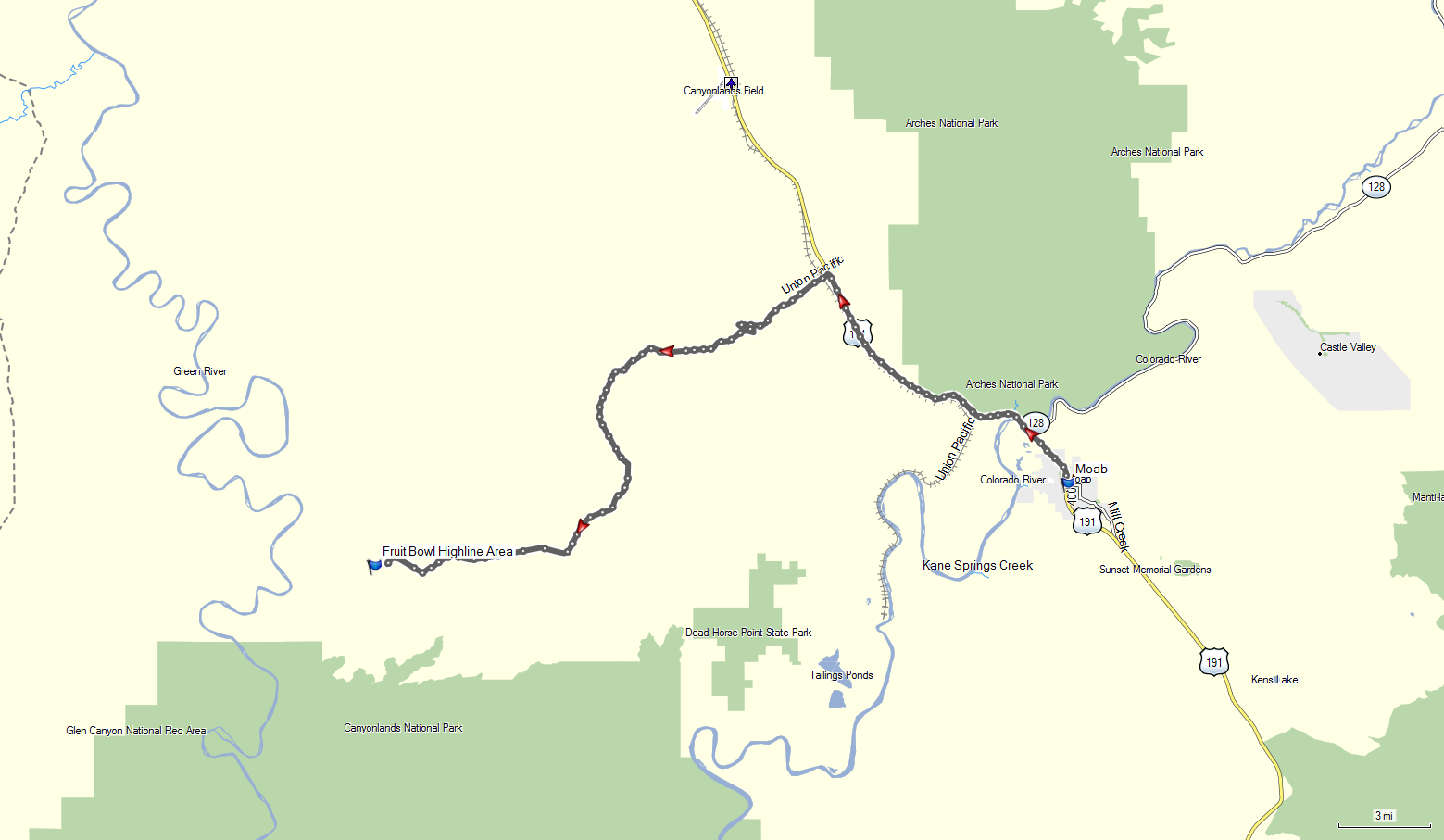
While surfing the Net to find new places to explore in the Moab area, I came across an interesting site called the Fruit Bowl. Apparently, it is quite popular with slack liners, base jumpers, and rock climbers from all over the world...


In the process of looking for directions to its location, I came across a nifty website called Maps to GPX. You simply enter a Google Map URL link and it converts the directions to a GPX file which can be uploaded and used in GPS units. Here's a track I created to the Fruit Bowl...

Click on image to enlarge

Wednesday, November 30, 2016

Truecaller App

If you have a cell phone, there is a pretty good chance you are getting spam calls from robo-dialers. And following Murphy's Law, these calls generally come at inopportune times.

A Google Play search for "cell phone spam blockers" brought up a number of apps of which I chose Truecaller due its good reviews and high number of downloads. It has only been on my phone for about a week and already has warned me of several spam calls which I have blocked for future calls.


The software has a number of other features which I am beginning to explore but it is the spam blocker that I use the most. It's still early but as of this writing, it works as advertised. If you have tried similar apps and like them, please feel free to comment in the section below.

Saturday, July 23, 2016

Gaia GPS

I use to upload my GPS tracks to EveryTrail but since their acquisition by TripAdvisor, all development and support has stopped and it does not work as well as it used to. As an alternative, I am looking at Gaia GPS.

I uploaded the track and photos from my Alpine Loop trip to create a photo map at https://www.gaiagps.com/datasummary/folder/7907392f-18e6-45d3-89c6-fbef162fb424/. Track details such as speed and elevation are available at https://www.gaiagps.com/datasummary/track/9ae70cc0-de55-4e30-939f-836965786571/. You can download tracks as GPX, KML or GeoJson files.

Click on photo to enlarge

I am still playing with the program so if you have any problems viewing the above, please let me know in the comment section below.

Update (8/23/16): AllTrails has acquired EveryTrail. Unfortunately, they want to charge you to upgrade to the version that has some of the more useful features such as being able to download or print maps.

Friday, April 01, 2016

Free Audiobooks

After numerous drives from Phoenix to Moab and back, I now find the most difficult part of the trip is the boredom. I have listened to every music CD I own multiple times as well as most of the radio stations along the way. I have even sunk to listening to "talk radio" (desperate times require desperate measures).

In an effort to breakup the monotony, I am going to try listening to some Audiobooks tomorrow. Most public libraries now offer them online at no charge. In the case of the Apache Junction Library, all I had to do was add an app called OverDrive to my smart phone. This app allows you download and play digital files on multiple devices. For the best sound possible, I am using the Ford Sync feature to play the file wirelessly through my truck's sound system (most late model vehicles allow you to connect to digital devices).

What's the first book on my list? It's Clinton Cash: The Untold Story of How and Why Foreign Governments and Businesses Helped Make Bill and Hillary Rich. Why this book you didn't ask? I am thinking of forming the Brown Foundation which will mirror the Clinton Fountain in its goals. Surely, those foreign governments that have given millions of dollars to the Clintons will want to donate to my foundation as we have the same objectives.

Of course (just like the Clintons), I will use a portion of those donations to cover my administration and travel expenses along with salaries for friends who support my lifestyle. One huge advantage I have over the Clintons is the fact that my legal expenses will be much less.

Update (4/2/16): The Audiobook turned out to be a wonderful way to pass the time. One caveat: do not read or listen to the Clinton Cash book without taking your blood pressure medicine. It's no wonder people distrust politicians and government.